viernes, julio 31, 2009

on 2 comments

Herramientas de Firefox: Hyperwords

"Desde siempre he tratado de contener el número de extensiones que instalo en Firefox, tratando de instalar sólo aquéllas que de verdad utilizo. Tengo como seis o siete pero Hyperwords creo que ya está aquí para quedarse. De hecho, tengo la sensación de haber empezado sólo a rascar en la superficie y que bien utilizada y sobre todo personalizada esta extensión puede multiplicar la utilidad del navegador.


Hacía tiempo que me habían hablado de esta ella pero hasta hace unos días no me había decidido a probarla. Hace esto: te permite hacer cosas e interactuar con cualquier texto que se selecciones en una página web. Haces doble clic sobre una palabra (para seleccionarla) o bien pinchas y arrastras (para seleccionar) varias palabras y al instante aparece un menú contextual con distintas opciones: buscar, compartir, etc.


Además de todas las opciones que trae de serie lo más interesante es la posibilidad de añadir nuestros propios buscadores o webs, editar (quitar o poner) ese menú e incluso asignar atajos de teclado a los distintos buscadores o acciones si hay alguna que utilicemos con mucha frecuencia.


Al seleccionar una palabra o una frase el menú de Hyperwords te permitirá:


  • Buscarla: en Google, en el mismo web en el que estás, web sociales (Twitter, Facebook, etc), Imágenes & Vídeo (Flickr, YouTube, etc), Mapas, noticias, etc.

  • Compartirla: por Email, Twitter, Facebook, delicious, etc.

  • Copiarla: incluye una opción de autocopiado al hacer doble clic sobre una palabra o seleccionar una frase o un párrafo. También puedes crear un archivo de texto, enviarlo a la impresora, etc.

  • Consultarla: Wikipedia, Google Definition, IMDb, Urban Dictionary, etc.


  • Traducirla: traducción que no te llevará a otra página sino que apacerá ahí mismo, en el lugar en el que habías seleccionado la palabra o frase original.

  • Verla: subrayarlo, encontrar más sitios de la misma página donde aparece esa palabra (borrando el resto del texto)

  • SEO: links que enlazan a esa página, información de Alexa, Pagerank, blogs que apuntan a esa web, etc.

  • Conversor: cuando seleccionas texto que contiene números puedes convertir la moneda, temperatura, distancia, etc.

  • Otras opciones: recuerda que puedes editar ese menú así que puedes añadir o quitar elementos a voluntad."
jueves, julio 30, 2009

miércoles, julio 29, 2009

on 1 comment

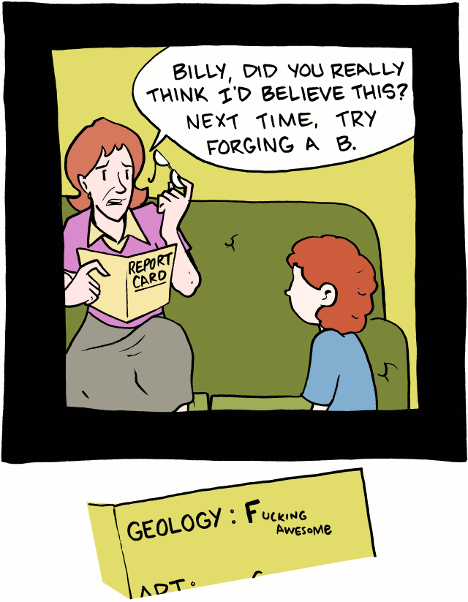
Grades cheat?

martes, julio 28, 2009

on 2 comments

Keeping your data from the FBI

Keeping your data from the FBI


After the terrorist attacks on September 11, 2001, the FBI been given more

or less free access to spying around, if you are suspected of being a terrorist,
or having any affiliate whatsoever with terrorism. (Aaah.. Haje uses the
same computer network (the Internet) as terrorists. That means we can search
his computer)


Because of this, here are some guidelines to keeping your data files safe from
the FBI:


  1. Invent your own language, and write all your letters and data in
    this language. Make sure nobody else knows this language, and make sure you
    don't keep notes about it. Also make sure that, if it has to be based
    on another language, base it on a Uralic language (instead of a Germanic,
    Slavic, Baltic or Hellenic language)


  2. ROT-13 encode all your messages. Make sure you do this manually
    - you never know what kind of logging routine Microsoft has built into Windows

  3. sdrawkcaB etirW

  4. Write your text document in Notepad, (ROT-13 rotated, backwards
    and in your new language) which doesn't keep those pesky temporary files


  5. PGP encrypt all your file. Do it three times, with different keys,
    just to be sure.

  6. Compress your file, using WinZip, or whatever other program you
    fancy. Remember to add a nice password to the ZIP file.

  7. Split your files into several segments (say about 50)


  8. Duplicate the files (so you get double the number of files, 100 in
    our case) and rename all the file numbers, just to confuse them, you know!
    Remember which 50 are needed, and which 50 are useless duplicates. Also, remember
    the correct order of the files. Also: if you omit as much as a single character
    in the files, your PGP encryption won't decrypt.

  9. Compress your files. Again. (use a new password)

  10. PGP encrypt your file. Again.(use a new password)


  11. Write your file to a 5¼ inch floppy disk (or even a 8"
    one)

  12. Destruct the computer you used to make the files.

    1. Take it apart completely


    2. Cut all the electric wires you can find

    3. Break all circuit boards

    4. Bend all connectors.

    5. open the hard drive


    6. With a hard tool (preferrably a diamond) scratch the hard drive platters
      as much as you can. Even better: sandblast the platters. It should
      look like frosted glass by the time you are finished

    7. demagnitize the harddrives completely


    8. Set it all on fire


  13. Put the floppy in a waterproof safe, and drop it over the Aegean
    Sea
    (or some other ocean nobody has heard about) preferrably
    from an inconspicious-looking cessna


See how easy that was?


Extracted from: www.everything2.com

domingo, julio 26, 2009

on Leave a Comment

Joy Division - Digital

Y esta es la version original de la yenka, para que compareis.


sábado, julio 25, 2009

miércoles, julio 22, 2009

on Leave a Comment

Algunas imagenes impactantes

Increible creatividad de este sueco, Erik Johansson, a mi me han encantado sus fotos:


sábado, julio 18, 2009

on Leave a Comment

Graffitis

Esta semana pasada terminaron unos graffitis alucinantes en mi empresa, aún no me he hecho con una foto de calidad de los mismos pero para ir haciendo boca encontre estos navegando por hay, a ver que os parece:

ezra-one-1


ezra-one-2


ezra-one-3


ezra-one-4


ezra-one-5


ezra-one-6


ezra-one-7


ezra-one-8


ezra-one-9


ezra-one-10


ezra-one-11

jueves, julio 16, 2009

on Leave a Comment

Pinturas de luz

Increibles pinturas de luz, o tambien Light paintings en inglés. Tambien conocidas como graffitis de luz, es una técnica fotográfica en la que se utilizan salas con poca luz o de noche. Estas imagenes en concreto son de Jan Wöllert y Jörg Miedza, los chicos detrás de LAPP-PRO.


Disfruten, porque ya se sabe 100 imagenes valen mal que 10MB de palabras.

Image selected for Amazing Light Paintings


Image selected for Amazing Light Paintings


Image selected for Amazing Light Paintings


Image selected for Amazing Light Paintings


Image selected for Amazing Light Paintings


Image selected for Amazing Light Paintings


Image selected for Amazing Light Paintings


Image selected for Amazing Light Paintings


Image selected for Amazing Light Paintings


Image selected for Amazing Light Paintings


Image selected for Amazing Light Paintings


Image selected for Amazing Light Paintings


Image selected for Amazing Light Paintings


Image selected for Amazing Light Paintings


Image selected for Amazing Light Paintings


Image selected for Amazing Light Paintings


Image selected for Amazing Light Paintings


Image selected for Amazing Light Paintings


Image selected for Amazing Light Paintings


Image selected for Amazing Light Paintings


Image selected for Amazing Light Paintings


Image selected for Amazing Light Paintings


Image selected for Amazing Light Paintings


Image selected for Amazing Light Paintings


Image selected for Amazing Light Paintings


Image selected for Amazing Light Paintings


Image selected for Amazing Light Paintings


Image selected for Amazing Light Paintings


Image selected for Amazing Light Paintings


Image selected for Amazing Light Paintings


Bonus - LAPP Nature


Image selected for Amazing Light Paintings


Image selected for Amazing Light Paintings


Image selected for Amazing Light Paintings


Image selected for Amazing Light Paintings


Image selected for Amazing Light Paintings